
Introduction
The modern workplace runs on collaboration, communication, and efficiency—and choosing the right productivity suite can make all the difference. In 2025, the two dominant players in this space remain Google Workspace and Microsoft 365.
Both platforms have invested heavily in AI-powered tools, automation, and enhanced collaboration features, making them more than just document and email providers—they’re full ecosystems for digital work. But while they share similarities, they are built with very different philosophies.
In this deep dive, we’ll compare Google Workspace and Microsoft 365 across usability, collaboration, security, pricing, and AI integration. Along the way, we’ll highlight real user experiences to give you a clear picture of which platform may be the best fit for your needs.
1. Core Philosophy
- Google Workspace is designed around simplicity and real-time collaboration. From Gmail and Google Docs to Drive, Calendar, and Meet, its focus is on being accessible from any device with a seamless cloud-first experience. For startups, remote teams, and fast-moving organizations, Workspace provides a lightweight but powerful toolkit that keeps things easy.
- Microsoft 365, in contrast, is built around power, familiarity, and enterprise-grade functionality. It combines Word, Excel, PowerPoint, Outlook, Teams, OneDrive, and SharePoint into a unified suite. For businesses that rely heavily on Windows, complex spreadsheets, or compliance requirements, Microsoft 365 offers a more robust environment with deeper integration into the desktop.
2. User Experience
One of the biggest differences between the two is usability:
- Google Workspace is widely praised for being intuitive. Users often describe it as “pick up and go”—perfect for teams that don’t want to spend hours training staff. The simple design of Docs, Sheets, and Slides makes them easy for anyone to use, even those unfamiliar with traditional office software. “Google Workspace is lighter and more intuitive for collaboration. We switched our startup to it in one afternoon and never looked back.” – Product Manager, SaaS Startup
- Microsoft 365 has a steeper learning curve because of its advanced features. Word and Excel are extremely powerful, but that power comes with complexity. For organizations with experienced staff, however, these tools are second nature. “Our finance team couldn’t live without Excel. The advanced formulas and pivot tables are far beyond anything in Google Sheets.” – CFO, Mid-Sized Business
3. Collaboration and File Management
- Google Workspace excels at real-time collaboration. Multiple users can edit a document simultaneously, with instant autosaving and powerful search features built in. Drive organizes files with ease, making it simple to share and manage permissions. For teams working remotely or across time zones, this flexibility is invaluable.
- Microsoft 365 also supports real-time collaboration but adds the ability to work both online and offline through its desktop apps. This makes it especially useful for teams in industries that require advanced formatting, offline editing, or integration with legacy systems. OneDrive and SharePoint provide robust file management but can be more complex to set up.
4. Security and Compliance
- Google Workspace offers strong built-in encryption and secure cloud storage, giving small and mid-sized teams confidence in their data security. It’s particularly appealing for companies that want privacy controls without heavy IT overhead.
- Microsoft 365 goes a step further with enterprise-grade compliance features, making it a favorite for industries such as healthcare, finance, and government. Advanced threat protection, data governance, and granular admin controls are built for organizations that need to meet strict regulatory standards.
5. AI and Automation
Both platforms have recently introduced AI assistants into their ecosystems:
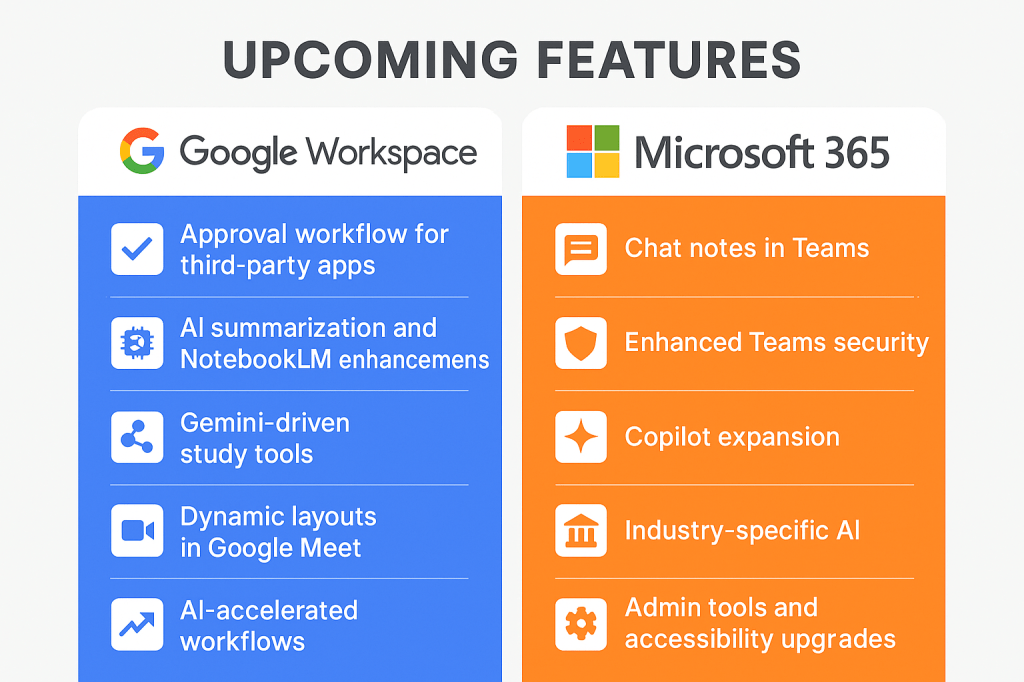
- Google Workspace now includes Gemini AI, which helps with drafting emails, summarizing meetings, generating presentations, and automating tasks across the suite.
- Microsoft 365 integrates Copilot, an AI assistant built into Word, Excel, Outlook, and Teams. Copilot not only drafts text but also creates advanced Excel formulas, builds PowerPoint slides, and manages inbox workflows.
For companies already leaning heavily on data analysis, Microsoft 365’s Copilot offers deeper functionality, while Google Workspace’s Gemini is ideal for users who want lightweight assistance without complexity.
6. Pricing and Value
Both suites are competitively priced, but they target different user needs:
- Google Workspace starts with affordable entry-level plans that include Gmail, Drive, Docs, and Meet, making it cost-effective for startups and small businesses. Even at higher tiers, it remains relatively straightforward and budget-friendly.
- Microsoft 365 offers more pricing tiers, with business and enterprise plans that unlock advanced features. While slightly more expensive, the added security, compliance, and AI capabilities often justify the cost for larger organizations.
7. Real-World Use Cases
- Small Business / Startup: A five-person remote team might choose Google Workspace for its simplicity, speed, and low cost.
- Mid-Sized Business: A marketing agency may adopt Asana or Slack alongside Workspace, but rely on its collaboration features to manage day-to-day documents and communication.
- Enterprise / Regulated Industry: A 500-person financial firm would lean toward Microsoft 365 because of its advanced compliance, desktop app integration, and strong admin controls.
“We chose Google Workspace because our team is spread across five countries. It’s easy, fast, and reliable.” – Startup CEO
“As a law firm, Microsoft 365 was the only choice. We needed the compliance tools and advanced Word editing features.” – Managing Partner, Legal Firm
8. Final Recommendations
- Choose Google Workspace if:
- You value simplicity, speed, and real-time collaboration.
- Your team is remote or globally distributed.
- You want an affordable, cloud-first productivity suite.
- Choose Microsoft 365 if:
- You need advanced document editing, Excel power, or Outlook integrations.
- Your business must meet strict security or compliance standards.
- You run a mid-to-large organization that relies heavily on Windows.
Conclusion and Call to Action
Both Google Workspace and Microsoft 365 are excellent productivity platforms, but they serve different needs. Workspace is the lightweight, collaboration-first choice for fast-moving teams, while Microsoft 365 is the enterprise powerhouse for organizations that demand advanced features, security, and compliance.
Which do you use—Google Workspace or Microsoft 365? Share your experiences in the comments below or let us know which features matter most for your business in 2025.


 ToolSyra
Leave a comment